View Options Bar
The View Options Bar is located at the top of the Scene View and provides users with the ability to adjust various rendering settings. This feature enhances the visual experience and gives you greater control over how your scene is displayed. You can toggle options such as ambient occlusion, bloom effects, and other visual enhancements to achieve your desired aesthetic and clarity.
For more detailed adjustments to specific parameters, you can use the Advanced View Options Panel, which is found in the right sidebar.
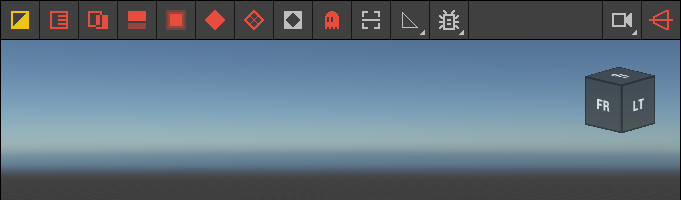 🔺 Figure 1: The View Options Bar.
Available Options
| Button | Name | Description |
|---|---|---|
 | Use Flat Shading | Toggles flat shading mode. When enabled, objects are rendered with a uniform base material, ignoring properties like metalness or roughness. |
 | Display Shadows | Toggles the rendering of shadows from all light sources. |
 | Display Alpha | Toggles the rendering of semi-transparent geometry. |
 | Display Ambient Occlusion | Toggles ambient occlusion rendering, which simulates soft shadows in areas where objects are close together, enhancing depth and realism. |
 | Display Bloom | Toggles bloom rendering, creating a soft glow around bright areas to simulate light scattering and bleeding. |
 | Display Ground | Toggles the rendering of the ground plane. |
| Display Base Grid | Toggles the rendering of the base grid. |
 | Display Background | Toggles the rendering of a solid background that obscures the sky. |
 | Display Ghosts | Toggles the rendering of background objects in isolate mode. |
 | Display Default Scan | Toggles the rendering of the asset's default scan and its bounding box instead of the scene objects. |
 | LOD | Sets the Level of Detail (LOD) displayed, allowing for editing of low-level voxel data for Voxel Layers using manual LOD. |
 | Debug Rendering | Activates a debug rendering mode that highlights properties such as metallic and roughness. |
 | Camera | Lists all available cameras and allows you to create a new camera from the current view. |
 | Use Perspective Projection | Toggles the camera's projection between perspective and orthographic views. |