Film
The Film effect simulates the characteristics of traditional film photography, adding a layer of realism and artistic quality to your voxel scenes. This effect can enhance the overall visual experience by mimicking the way light interacts with film, including exposure adjustments, tonemapping, and gamma correction.
When the Film effect is enabled, your scenes will exhibit a more cinematic look, with improved color grading and dynamic range, making them feel more polished and professional.
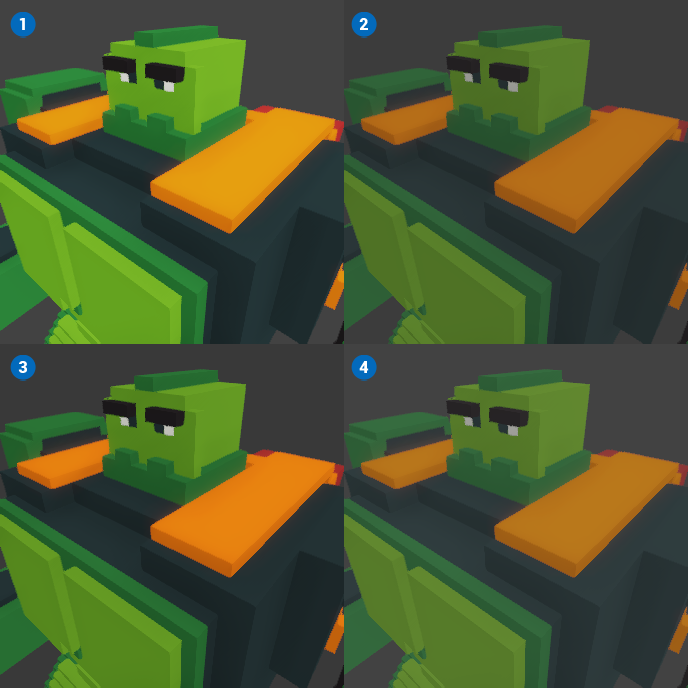 🔺 Figure 1 Tonemapping: 1️⃣ ACES approximation, 2️⃣ Hable, 3️⃣ Uchimura, 4️⃣ Reinhard.
Settings
Exposure: This setting controls the overall brightness of the scene. Adjusting the exposure can help to achieve the desired lighting balance, making the image appear brighter or darker based on your artistic vision.
Tonemapping: This setting determines how the colors and brightness levels are mapped to the final output. You can choose from several tonemapping options:
- Linear: A straightforward mapping that preserves the original colors without any adjustments.
- Aces: A filmic tonemapping curve that provides a more cinematic look, suitable for high dynamic range (HDR) content.
- Hable: A popular tonemapping curve that offers a good balance between highlights and shadows, creating a pleasing visual result.
- Uchimura: A tonemapping method that emphasizes mid-tones and provides a softer transition between light and dark areas.
- Reinhard: A tonemapping technique that compresses the dynamic range, making it suitable for scenes with extreme brightness differences.
Gamma Correction: This setting adjusts the gamma value of the scene, affecting the mid-tone brightness. A higher gamma value will brighten the mid-tones, while a lower value will darken them, allowing for fine-tuning of the overall contrast and brightness in your visuals.