Skip to content

Chromatic Aberration

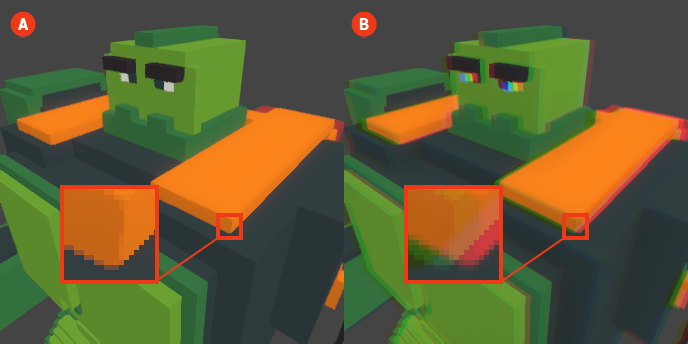
Chromatic Aberration is a visual effect that simulates the dispersion of light, creating a subtle separation of colors along the edges of objects in your voxel scenes. This effect can enhance the realism of your graphics by mimicking the imperfections found in camera lenses, adding a layer of depth and complexity to the visual presentation.

When Chromatic Aberration is enabled, you will notice a slight color fringing around the edges of bright objects, which can contribute to a more immersive experience by providing a sense of realism.

Chromatic Aberration 🔺 Figure 1 🅰️ Without Chromatic Aberration. 🅱️ With Chromatic Aberration Enabled.

Settings

  • Shift X: This setting controls the horizontal displacement of the color channels. Adjusting this value will shift the red and blue channels left or right, affecting how the colors are perceived along the horizontal axis.

  • Shift Y: This setting controls the vertical displacement of the color channels. Adjusting this value will shift the red and blue channels up or down, impacting the color separation along the vertical axis.

  • Intensity: This setting determines the strength of the Chromatic Aberration effect. A higher intensity will result in more pronounced color separation, while a lower intensity will create a subtler effect.