Creating and Deleting Objects
Foxel lets you create new objects directly inside the current asset.
Depending on the asset type and workflow, this can include layers, references, cameras, lights, helper objects, and other scene objects.
Creating Objects
You can create objects in two ways:
- Click the Create button in the Hierarchy.
- Choose Object > Create and then select the object type.
After selecting an object type, Foxel opens the Create Object dialog.
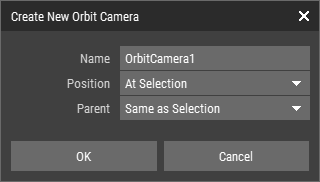 🔺 Figure 1: The Create Object dialog.
Common Options
The following options are available for most object types:
| Name | Defines the name of the new object. |
| Position | Defines where the new object is created. |
| Parent | Defines where the new object is inserted in the hierarchy. |
Some object types provide additional options. For example, a Voxel Layer can define a starting shape.
Position Options
| At View Focus | Creates the object at the current view focus position. |
| At World Origin | Creates the object at the world origin. |
| At Selection | Available only when an object is active when the dialog is opened. Creates the new object at the active object's position and also matches its orientation and scale. |
Parent Options
| Same as Selection | Uses the same parent as the active object. |
| Root | Creates the object at the top level of the hierarchy. |
Deleting Objects
You can delete objects in two ways:
- Select the objects in the Hierarchy and click the Delete button.
- Choose Object > Delete.
Deleting an object also deletes all of its child objects.
Related Topics
- Scene Objects Overview: Learn how objects fit into the scene workflow.
- Selecting Objects: Learn how to select objects before editing or deleting them.
- Editing Object Properties: Learn how to edit the properties of the selected object.
- Organizing Objects: Learn how to structure objects in the hierarchy.