Creating Minis from Selections
You can create a new Mini from voxel or pixel selections and add it to the active Mini Set.
Because each Mini Set has its own Color Palette and Material Set, the selected colors and materials are remapped to the entries available in the active Mini Set when the Mini is created.
The generated Mini is limited to a size of 32 × 32 pixels and a maximum height of 32. Any data beyond these limits is cropped.
Creating a Mini from a Voxel Selection
- Select the voxels you want to convert into a Mini.
- Choose Voxel > Create Mini from Selection.
- Adjust the settings in the dialog.
- Click OK.
During this process, Foxel converts the selected voxel data into 2D Mini data by viewing the selection from the chosen direction. The first visible voxel along each ray is used to determine the stored color, material, and height.
Dialog Settings
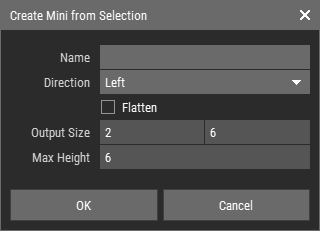 🔺 Figure 1: The Create Mini from Selection dialog.
- Name: Sets an optional name for the new Mini.
- Direction: Defines the direction from which the voxel selection is processed.
- Flatten: Creates the Mini without height information.
- Output Size: Shows the size of the generated solid area.
- Max Height: Shows the maximum height found in the generated data.
Note
When the dialog opens, the Direction is automatically set to the direction closest to the current camera view.
Creating a Mini from a Pixel Selection
You can also create a Mini from a pixel selection.
This works in the same general way, but no direction setting is needed because the source data is already two-dimensional. Open the command, adjust the settings, and confirm to add the Mini to the active Mini Set.