Skip to content

Depth of Field

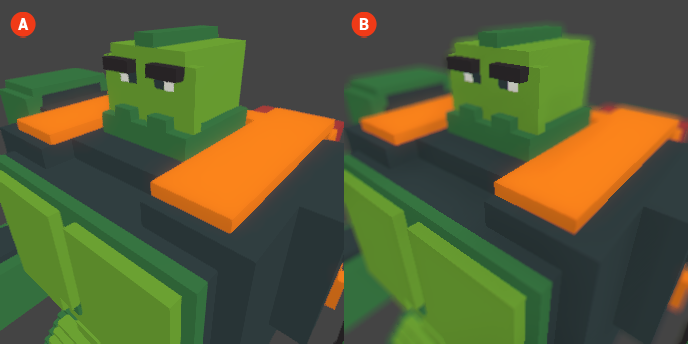
Depth of Field (DoF) is a photographic effect that simulates the way a camera lens focuses on a specific subject while blurring the background and foreground. This effect can enhance the visual storytelling of your voxel scenes by directing the viewer's attention to particular elements, creating a sense of depth and immersion.

When Depth of Field is enabled, areas that are outside the focus range will appear blurred, mimicking the natural behavior of a camera. This can add a cinematic quality to your scenes, making them feel more dynamic and engaging.

Depth of Field 🔺 Figure 1 🅰️ Without Depth of Field. 🅱️ With Depth of Field Enabled.

Settings

  • Focus Distance: This setting determines the distance from the camera at which objects will be in sharp focus. Adjusting this value allows you to control which elements of the scene are clear and which are blurred.

  • F-Stop: The F-Stop setting controls the aperture of the virtual camera. A lower F-Stop value will create a shallower depth of field, resulting in more pronounced blurring of the background and foreground. A higher F-Stop value will increase the depth of field, keeping more of the scene in focus.

  • Focal Length: This setting adjusts the focal length of the virtual camera lens. A longer focal length will compress the scene and enhance the blurring effect, while a shorter focal length will create a wider field of view and a more pronounced depth of field effect.