Skip to content

Lens Texture

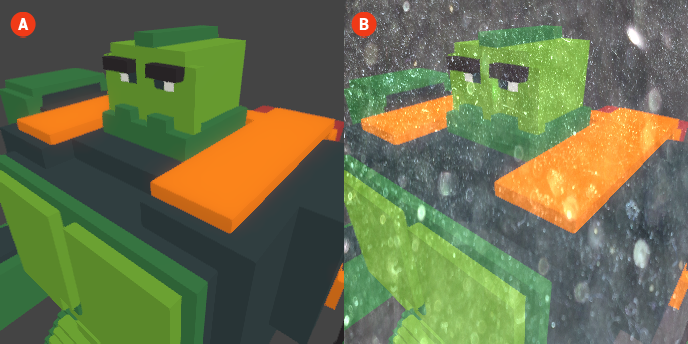
The Lens Texture effect allows you to apply a custom texture to the lens of the virtual camera, adding unique visual characteristics to your voxel scenes. This effect can enhance the overall aesthetic by introducing patterns or details that interact with the rendered image, creating a more personalized and artistic look.

When the Lens Texture effect is enabled, the selected texture will be overlaid on the final rendered image, affecting how the visuals appear. This can add depth and complexity to the scene, making your visuals stand out.

Lens Texture 🔺 Figure 1 🅰️ Without Lens Texture. 🅱️ With Lens Texture Enabled.

Settings

  • Texture: This setting allows you to select one of the shared textures to apply to the lens.

  • Filter: This setting determines how the texture is sampled. You can choose between:

    • Linear: This filter provides smooth transitions between texture pixels, resulting in a softer appearance.
    • Nearest: This filter uses the nearest pixel value, creating a more pixelated and defined look.