Generating Voxel Movies
Foxel can generate a Voxel Movie from an animated Voxel Scene or Mesh Asset.
This converts animated content into frame-by-frame voxel data.
Generating a Voxel Movie
To generate a Voxel Movie:
- Open the Voxel Scene or Mesh Asset you want to convert.
- Select Animation > Generate Voxel Movie.
- Adjust the settings in the dialog.
- Start the generation.
Generate Voxel Movie Dialog
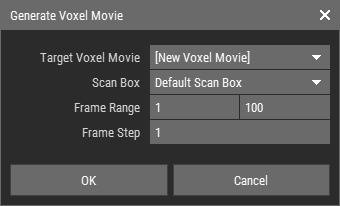
Target Voxel Movie
Select an existing Voxel Movie to append frames to, or create a new Voxel Movie.Scan Box
Select the Scan Box used for capture, or use the asset's Default Scan Box.Frame Range
Defines which frames are processed.Frame Step
Defines how many frames are skipped between captures.
How Generation Works
During generation, Foxel processes the selected frame range and captures the contents inside the Scan Box.
For each captured frame:
- Objects inside the Scan Box are voxelized or transformed as needed.
- The result is merged into a single voxel grid.
- That voxel grid is compared with the previously generated keyframe.
If the voxel result has changed, Foxel creates a new Voxel Keyframe. If it has not changed, Foxel increases the duration of the previous keyframe instead.
This helps reduce unnecessary duplicate keyframes in the generated Voxel Movie.