Shared Prefab Packages
Prefab Packages are ZIP files that contain Prefabs, making it easy to distribute and install collections of Prefabs within Foxel. For more information on Prefabs and how to create and edit Prefab Packages, please refer to the Prefabs Manual.
Managing Prefab Packages
Prefab Packages are managed through the Prefab Packages Tab of the Prefabs Panel.
Activating Prefab Packages
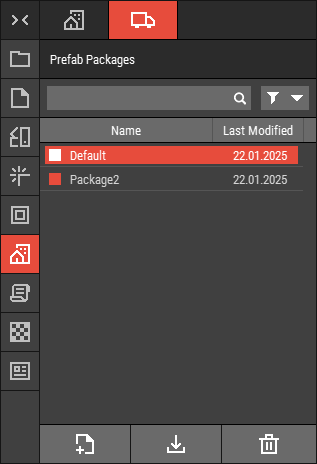 🔺 Figure 1 The Prefab Packages Tab.
To use the Prefabs contained within a package, the package must be activated. You can do this by selecting the package from the dropdown on the Prefabs Tab, or by selecting the package, right-clicking, and then choosing Activate from the context menu.
File Location
The default Prefab Package is located at:Documents\Foxel\default.fxlpkg
All other custom Prefab Packages are stored in the following directory:Documents\Foxel\Shared\PrefabPackages
File Format
Prefab Packages are common ZIP files with the file extension .fxlpkg.
Importing and Exporting Prefab Packages
To import a package, install it via the Prefab Packages Tab. This action will copy the file to the shared folder. Please note that exporting is not available for Prefab Packages.