Scripts Panel
The Scripts Panel is located in the Left Sidebar of the Foxel workspace. This panel is essential for creating and managing scripts within your voxel projects. Scripts in Foxel are written in Lua and can be utilized in various ways, including being assigned to script buttons, executed from the Quick Access Panel, and used for command-line operations.
For more information on scripting, please refer to the Scripting section.
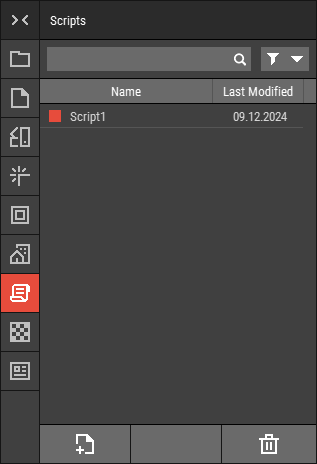 🔺 Figure 1 The Scripts Panel.
Features
Create New Script: Start a new script by clicking the New Script button.
Edit Existing Script: To edit a script, double-click on its name in the panel. This will open the script in the dedicated editor specified in your Preferences. If no dedicated editor is set, the script will open in the default editor for the
.luafile type.Manage Scripts: You can rename, delete, or duplicate scripts directly from this panel. For more information, see Working with Files.
Assign and Execute Scripts: You can assign scripts to script buttons by dragging and dropping the script onto the desired button. To execute the script, simply click the button. Alternatively, you can select the script, right-click, and choose Execute from the context menu. For more information, see Executing Scripts.