Shearing Voxel Grids
The Shear operation allows you to distort a selected voxel grid along a specified axis. This transformation can create interesting effects by slanting the voxels in a way that alters their shape without changing the overall volume.
Steps to Shear Voxel Grids
- Select voxels or Voxel Layers.
- Navigate to Voxel > Transform > Shear.
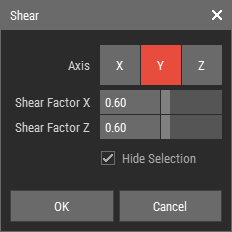
- In the shear dialog, select the axis you want to shear along (X, Y, or Z).
- Enter the shear factors for the other two axes. For example, if you select the Y axis, you will provide shear factors for the X and Z axes.
- Click OK to apply the shear transformation to the selected voxel grid.
Shear Dialog Parameters

- Axis: Select the axis along which you want to apply the shear.
- Shear Factors: Enter the shear factors for the other two axes. These values determine how much the voxel grid will be distorted along the selected axis.
- Hide Selection: Enable this option to toggle the highlighting of selected voxels, which can enhance your ability to visualize the changes more effectively.