Sharpen
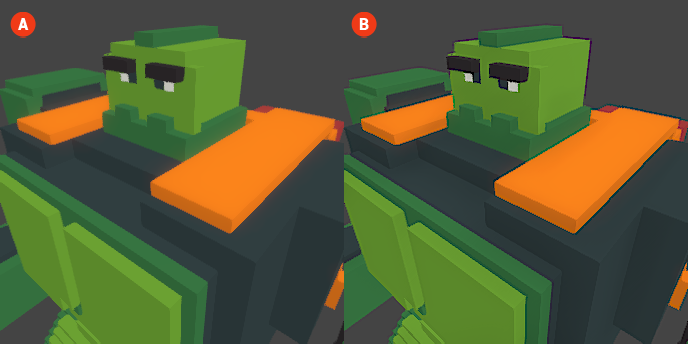
The Sharpen effect enhances the clarity and detail of your voxel scenes by increasing the contrast along the edges of objects. This effect can make your visuals appear crisper and more defined, helping to bring out finer details that may otherwise be lost in the rendering process.
When the Sharpen effect is enabled, the edges of objects will become more pronounced, resulting in a more visually striking image. This effect is particularly useful for emphasizing textures and details in your voxel art.
🔺 Figure 1 🅰️ Without Sharpen. 🅱️ With Sharpen Enabled.
Settings
- Intensity: This setting controls the strength of the Sharpen effect. A higher intensity will result in a more pronounced sharpening of edges, while a lower intensity will create a subtler effect, allowing you to customize the level of detail enhancement in your scene.