Shared Scripts
In Foxel, Lua scripts are powerful tools that allow you to extend the functionality of your projects using the Foxel API. These scripts can be utilized in various ways to enhance your workflow and automate tasks.
Key Features of Lua Scripts
- Script Buttons: You can assign Lua scripts to script buttons within the application, providing quick access to frequently used functionalities.
- Quick Access Panel: Scripts can be executed directly from the Quick Access Panel, allowing for efficient execution without navigating through menus.
- Command-Line Automation: Lua scripts can be used in the command-line interface to automate tasks such as batch exporting, streamlining your workflow.
For more detailed information on using Lua scripts and the Foxel API, please refer to the Scripting section.
Managing Scripts
Scripts are managed through the Scripts Panel.
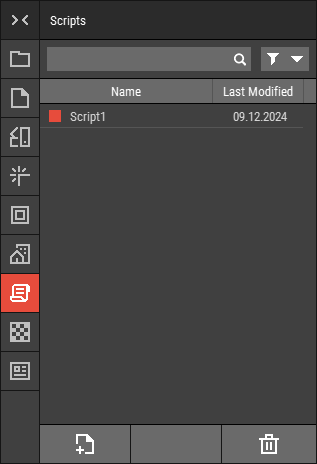 🔺 Figure 1 The Scripts Panel.
File Location
All Lua script files are stored in the following directory:Documents\Foxel\Shared\Scripts\
File Format
Unlike other shared files, Lua scripts are saved as simple text files with the .lua file extension. This means they do not use a proprietary file format, making them easy to edit with any text editor.
Importing and Exporting
Please note that Lua scripts cannot be imported or exported. They are designed to be created and managed directly within the Foxel environment.