Visual Resources Panel
The Visual Resources Panel is located in the Left Sidebar of the Foxel workspace. This panel is used to import and manage shared textures, cubemaps, and LUTs (Look-Up Tables). Each type has its own dedicated tab for easy navigation.
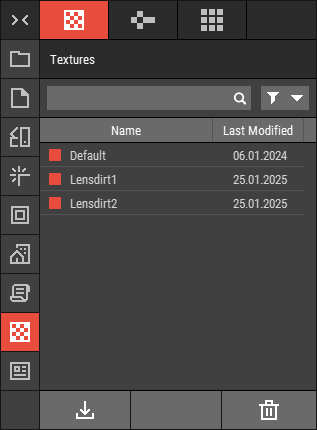 🔺 Figure 1 The Visual Resources Panel.
Textures Tab
The Textures Tab is used to import and manage shared textures, which are utilized for overlays and lens textures. For more information, see Shared Textures.
Cubemaps Tab
The Cubemaps Tab is used to import and manage cubemaps, which are essential for image-based lighting (IBL) and background settings. For more information, see Shared Cubemaps.
LUTs Tab
The LUTs Tab is used to import and manage Look-Up Tables, which are employed for color grading in your projects. For more information, see Shared LUTs.
Common Features
Import: Import existing textures, cubemaps, or LUTs from your local files into the panel for use in your projects.
Manage: Organize and manage your shared textures, cubemaps, and LUTs, including options to rename, delete, or duplicate them as needed. For more information, see Working with Files.