Hierarchy Panel
The Hierarchy Panel is a crucial component of the Foxel workspace, located in the Right Sidebar. It provides a structured view of all the objects present in your current scene, allowing you to manage and organize them efficiently. This panel is essential for maintaining an organized workflow, especially when working on complex projects with multiple elements.
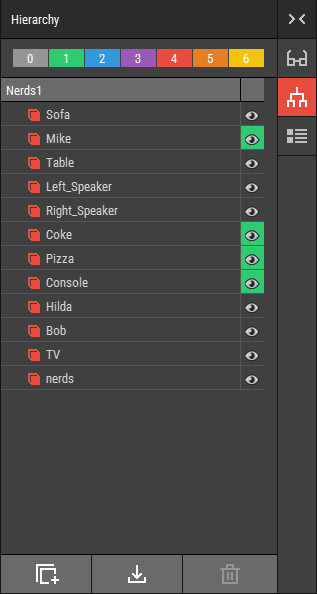 🔺 Figure 1: The Hierarchy Panel displays a structured list of all objects in the current scene. At the top, the colored object layer buttons allow for easy management of object visibility and organization.
Key Features
Object Organization: Manage your objects effectively by creating parent-child relationships, grouping them, and rearranging their order. For more information refer to the Organizing Objects section.
Object Management: Quickly create new objects, select existing ones, or delete them as needed to keep your workspace tidy.
Visibility Control: Easily show or hide objects in your scene, allowing for a cleaner workspace and focused editing.
File Importing: Import files directly into the hierarchy of the active asset, streamlining your workflow and ensuring that all necessary elements are easily accessible.
Object Layer Management
At the top of the Hierarchy Panel, you will find colored buttons that allow you to manage your objects via layers. This feature is particularly useful for organizing complex scenes and controlling the visibility of different elements. For more information on using object layers, please refer to the Using Object Layers section.