Project Properties
To access the properties of your current project, navigate to File > Project Properties. This will open the Project Properties dialog, where you can view and modify key settings for your project.
Project Properties Dialog
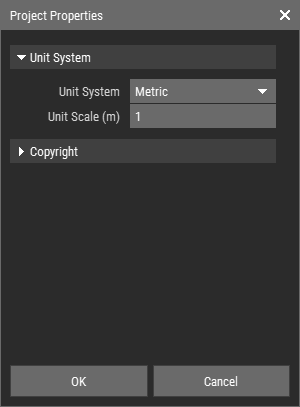
The Project Properties dialog includes the following options:
Unit System: Choose between metric or imperial units for your project.
Unit Scale: Define the size per unit (or voxel) for your project, which will affect how dimensions are represented.
Copyright Info: Review and update the copyright information associated with your project, including:
- Creator: The name of the creator.
- Copyright Status: The current status of the copyright.
- Copyright Notice: A notice regarding the copyright.
- Copyright Info URL: A URL for additional copyright information.
INFO
The copyright information you provide will be automatically copied to every new asset created within the project, ensuring that your work is properly attributed.