Creating Projects
To create a new project, follow these simple steps:
- Navigate to File > New Project.
- Fill in the New Project dialog with the required information.
- Click OK to create and open the new project.
Upon creation, the new project will also include an empty Voxel Scene, which will be opened automatically.
New Project Dialog Properties
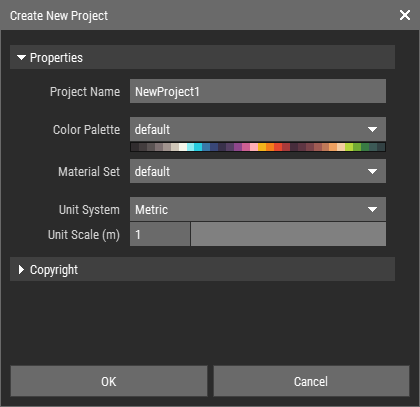
Project Name: This will also be the folder name on your hard drive. It must adhere to the Naming Rules.
Color Palette: You can select the default color palette or any color palette stored in the shared folder.
Material Set: Similar to the color palette, you can choose a material set that suits your project.
Unit System: Choose between metric or imperial units.
Unit Scale: Define the size per unit (or voxel) for your project.
Additional Copyright Info:
- Creator: Your name or the name of the creator.
- Copyright Status: The status of the copyright for the project.
- Copyright Notice: A notice regarding the copyright.
- Copyright Info URL: A URL for additional copyright information.
INFO
The copyright information you provide will be automatically copied to every new asset created within the project, ensuring that your work is properly attributed.