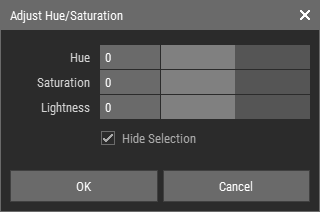
Adjust Hue/Saturation
The Adjust Hue/Saturation operation allows users to modify the color properties of a voxel grid by shifting the hue, saturation, and lightness of the colors. This operation is particularly useful for enhancing the visual appeal of voxel models and creating unique color variations.
Steps to Adjust Hue/Saturation
- Select voxels or Voxel Layers.
- Navigate to Voxel > Filter > Adjust Hue/Saturation.
- Adjust the parameters in the Adjust Hue/Saturation dialog.
- Click OK to apply the changes.
Note
Foxel uses indexed color, meaning that the calculated new colors are matched with the active color palette to find the closest color representation.
Adjust Hue/Saturation Dialog Parameters

- Hue: Shifts the color around the color wheel, allowing for a change in the overall color tone.
- Saturation: Adjusts the intensity of the color; increasing saturation makes colors more vivid, while decreasing it results in more muted tones.
- Lightness: Modifies the brightness of the colors; increasing lightness makes colors lighter, while decreasing it makes them darker.
- Hide Selection: Enable this option to toggle the highlighting of selected voxels, which can enhance your ability to visualize the changes more effectively.