Fog
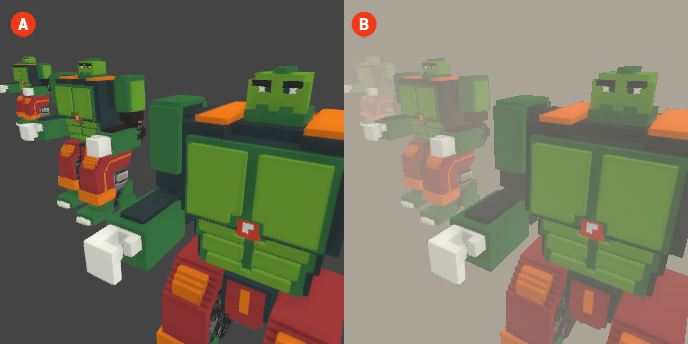
The Fog effect adds a layer of atmospheric depth to your voxel scenes, simulating the natural phenomenon of fog or haze. This effect can enhance the mood and realism of your environments by softening distant objects and creating a sense of depth. Fog can be particularly effective in outdoor scenes or areas where you want to evoke a specific atmosphere.
When the Fog effect is enabled, objects in the background will appear more muted and less defined, while foreground elements remain clear. This can help to create a more immersive experience by guiding the viewer's focus and enhancing the overall visual narrative.
🔺 Figure 1 🅰️ Without Fog. 🅱️ With Fog Enabled.
Settings
Color: This setting allows you to choose the color of the fog. You can select a color that complements the overall mood of your scene, whether it be a light mist or a dense, colored fog.
Density: The density setting controls how thick the fog appears in the scene. A higher density will result in a more pronounced fog effect, obscuring distant objects more significantly, while a lower density will create a subtler fog that allows for greater visibility.