Hierarchy
The Hierarchy is located in the left panel of the Scene page within the Pages workspace layout.
It shows all objects in the currently open asset as a structured list. Use it to select objects, organize scene structure, control visibility, and manage complex scenes more easily.
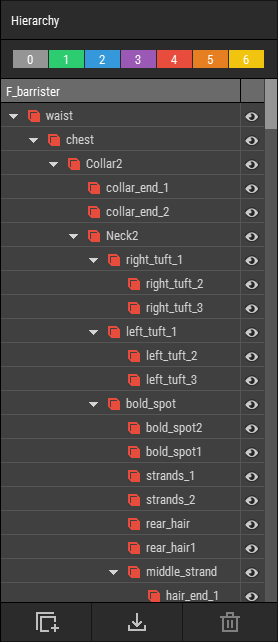 🔺 Figure 1: The Hierarchy displays all objects in the current scene. The colored buttons at the top provide quick access to object layers.
What the Hierarchy Is Used For
The Hierarchy helps you manage the structure of a scene.
Typical tasks include:
- Selecting objects to edit them in the Inspector.
- Reordering and grouping objects to keep the scene organized.
- Creating parent-child relationships to build object hierarchies.
- Showing or hiding objects to focus on a specific part of the scene.
- Managing Object Layers to organize larger scenes and control visibility more efficiently.
As scenes grow, the Hierarchy becomes the main place for keeping everything structured and easy to navigate.
Working with the Hierarchy
The Hierarchy is most often used together with the Inspector:
- Select an object in the Hierarchy to view and edit its properties in the Inspector.
- Change the structure of the scene by grouping objects or moving them under different parents.
- Hide unrelated objects temporarily to reduce visual clutter while editing.
For detailed information about scene structure and object management, see Organizing Objects.
Object Visibility
The Hierarchy allows you to quickly control which objects are visible in the Scene View.
This is useful when:
- isolating a specific part of a scene,
- reducing distraction while editing,
- or working on scenes with many overlapping objects.
Hiding an object only affects its visibility in the scene. It does not remove the object from the asset.
Object Layers
At the top of the Hierarchy, colored buttons provide access to Object Layers.
Object Layers help organize scene content into separate categories. They are especially useful in larger scenes where you want to manage groups of objects together, for example to hide environment objects while working on characters or props.
For more information, see Using Object Layers.
Related Topics
- Inspector: Edit the properties of the selected object.
- Pages: Learn how the page system works.
- Organizing Objects: Learn how to group, parent, and manage objects.