Ambient Occlusion
Ambient Occlusion is a rendering technique used to calculate the way light interacts with surfaces in a 3D environment. It enhances the depth and realism of scenes by simulating how light is occluded or blocked by nearby objects. This effect is particularly useful in creating more believable shadows and highlights, giving your voxel scenes a richer visual experience.
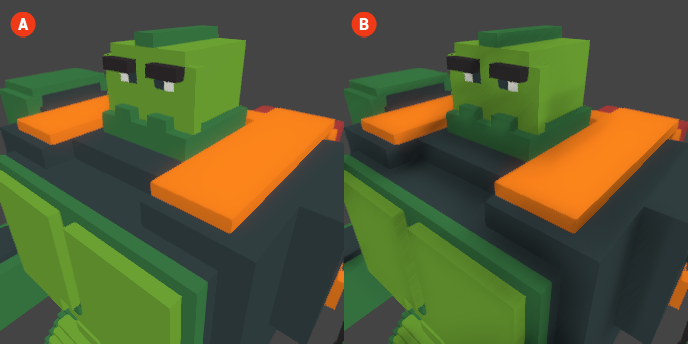
When Ambient Occlusion is enabled, areas that are close to other surfaces will appear darker, while more exposed areas will remain lighter. This creates a sense of depth and helps to define the spatial relationships between objects in the scene. The result is a more immersive and visually appealing environment.
🔺 Figure 1 🅰️ Without Ambient Occlusion. 🅱️ With Ambient Occlusion Enabled.
Settings
- Intensity: This setting controls the strength of the Ambient Occlusion effect. A higher intensity will result in darker shadows and more pronounced depth, while a lower intensity will create a subtler effect.
- Radius: The radius setting determines how far the occlusion effect extends from the surfaces. A larger radius will create a broader area of influence, affecting more distant surfaces, while a smaller radius will limit the effect to nearby objects.