Projects Panel
The Projects Panel is located in the Left Sidebar of the Foxel workspace and serves as the central hub for managing all your projects. Here, you can create new projects, open existing ones, and efficiently organize your work.
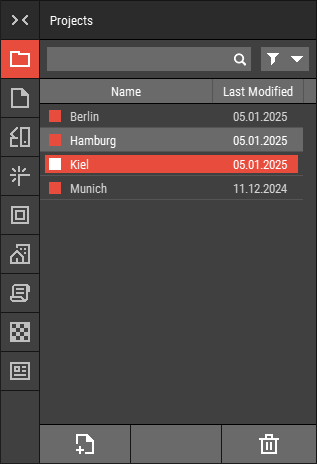 🔺 Figure 1: The Projects Panel.
Features
Create New Project: Start a new project by clicking the "New Project" button. You will be prompted to enter a name, select a color palette, and choose a material set. All projects are stored in the
/projectsfolder, with each project saved as a subfolder named after the project. For more information, see Creating Projects.Open Existing Projects: All previously created projects are listed in this panel. Double-click on a project to open it and continue your work. For more information, see Opening Projects.
Manage Projects: You can rename, delete, or duplicate projects directly from this panel. Duplicating projects allows you to create copies for different purposes or iterations. For more information, see Working with Files.