Place Mini
Use Place Mini to generate voxel data from a Mini and place it into a voxel grid.
This is useful for placing one or more copies of a Mini into a Voxel Layer.
For more information about Minis, see Minis.
How to Use It
- Select a Voxel Layer.
- Go to Voxel > Operations > Place Mini.
- Adjust the options.
- Confirm the dialog.
Options
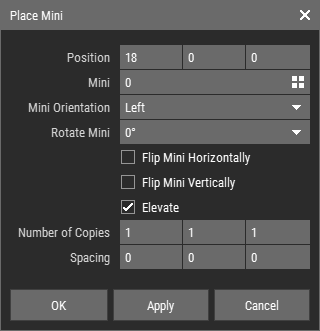
- Position: Sets the position of the first placed Mini.
- Mini: Sets the Mini to place.
- Mini Orientation: Sets the direction in which the Mini is projected.
- Rotate Mini: Rotates the Mini in 90° steps.
- Flip Mini Horizontally: Flips the Mini horizontally.
- Flip Mini Vertically: Flips the Mini vertically.
- Elevate: Uses the Mini height values to generate voxel depth instead of placing it flat.
- Number of Copies: Sets how many copies are placed along each axis.
- Spacing: Sets the spacing between the copies along each axis.
Notes
- Colors and materials from the Mini are mapped to the color palette and material set of the open asset.
- When the dialog opens, the Mini orientation is aligned to the closest direction facing the camera, and the position is initialized so the first Mini is placed on the voxel grid slice nearest to the camera.
- Empty outer areas of the Mini are cropped automatically, so the default spacing between copies is zero even if the Mini is not completely filled.