Skip to content

Grain

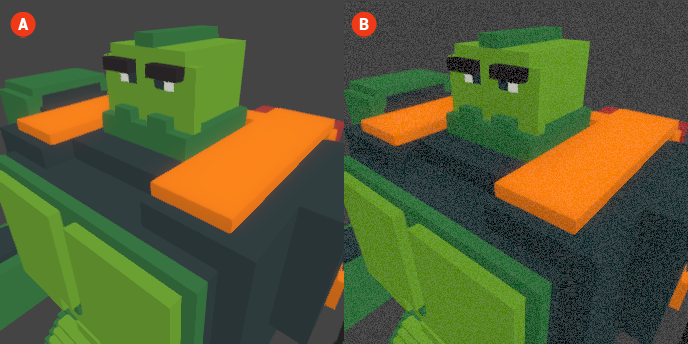
The Grain effect adds a textured appearance to your voxel scenes, simulating the look of film grain or noise. This effect can enhance the visual style of your graphics, giving them a more organic and tactile quality. Grain can be particularly effective in creating a nostalgic or artistic atmosphere, reminiscent of classic films or vintage photography.

When the Grain effect is enabled, a subtle noise pattern is applied across the entire scene, which can add depth and character to the visuals. This effect can help to unify the elements of your scene, making them feel more cohesive.

Grain 🔺 Figure 1 🅰️ Without Grain. 🅱️ With Grain Enabled.

Settings

  • Static: This setting determines whether the grain effect remains constant throughout the scene or changes dynamically with each frame. When set to static, the grain will not change, providing a consistent texture that enhances the overall look without distracting from the action.

  • Intensity: This setting controls the strength of the grain effect. A higher intensity will result in a more pronounced grain appearance, while a lower intensity will create a subtler effect, allowing you to customize the level of texture in your scene.