Scaling to Fit Voxel Grids
The Scale to Fit operation allows you to adjust the dimensions of the selected Voxel Layers so that the contained voxels fit into the new voxel grid size.
This operation can be useful for ensuring that your voxel models are appropriately scaled to fit specific requirements or to create different variations of your designs.
Steps to Scaling to Fit Voxel Grids
- Select voxels or Voxel Layers.
- Navigate to Voxel > Transform > Scale to Fit.
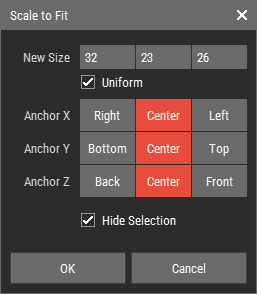
- Adjust the scale parameters in the scale to fit dialog.
- Click OK to apply the scaling to the selected voxel layers.
Scale to Fit Dialog Parameters

- New Size: Enter the new dimensions for the voxel grid.
- Uniform: Check this option to maintain the aspect ratio while scaling.
- Anchor X/Y/Z: The nine anchor buttons determine the point from which the scaling occurs, organized by axis (left, center, right for X; top, middle, bottom for Y; front, center, back for Z).
- Hide Selection: Enable this option to toggle the highlighting of selected voxels, which can enhance your ability to visualize the changes more effectively.