Resize
Use Resize to change the size of selected Voxel Layers.
This is useful when you want to make a voxel grid larger or smaller manually.
How to Use It
- Select one or more Voxel Layers.
- Go to Voxel > Resize.
- Adjust the values.
- Confirm the dialog.
Options
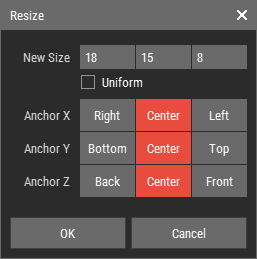
- New Size: Sets the new voxel grid size.
- Uniform: Keeps the proportions while resizing.
- Anchor X/Y/Z: Sets the anchor point that stays fixed while the voxel grid is resized.
Notes
- This operation always affects the entire voxel grid and ignores voxel selections.