Projects Overview
In Foxel, a Project is a dedicated folder on your hard drive that contains all the files associated with your creative endeavors. Each project serves as a centralized hub for organizing and managing your work, ensuring that all necessary components are easily accessible. By organizing your work into projects, you can streamline your creative process and maintain a clear structure for your designs, ultimately enhancing your workflow and creativity.
Key Components of a Project
Assets: Each project includes main project files known as assets. These are the building blocks of your creations and can include various types of media, such as Voxel Scenes, Voxel Movies, Heightmaps, and Mesh Assets. For more information on assets, please refer to the Assets section.
Mini Sets: Projects also contain Mini Sets, which are collections of smaller, reusable components that can be integrated into your larger designs. To learn more about Mini Sets, visit the Minis section.
Color Palette and Material Set: Each project is equipped with its own unique color palette and Material Set. All assets and Mini Sets within the project utilize the colors and materials defined in these files, ensuring a cohesive look and feel throughout your work. To learn more about colors and materials, visit the Colors and Materials section.
Managing Projects
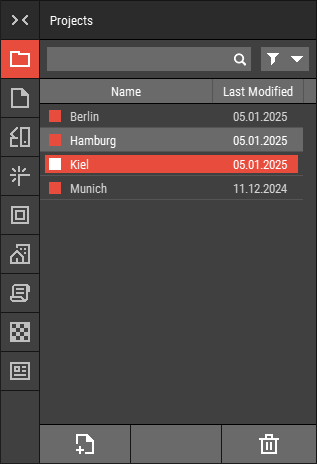 🔺 Figure 1: The Projects Panel allows you to manage your projects efficiently.
All projects can and should be managed directly within Foxel using the Projects Panel. Here you can create, rename, duplicate, and delete projects.
Additional Topics
For more detailed instructions on how to create and open projects, please explore the following sections:
- Creating Projects: Learn how to create new projects within Foxel.
- Opening Projects: Instructions on how to open and access your projects.
- Project Properties: Detailed information on the properties associated with a project.